Monday, January 2, 2023

Create calendar with Excel formula and conditional formatting Part 2

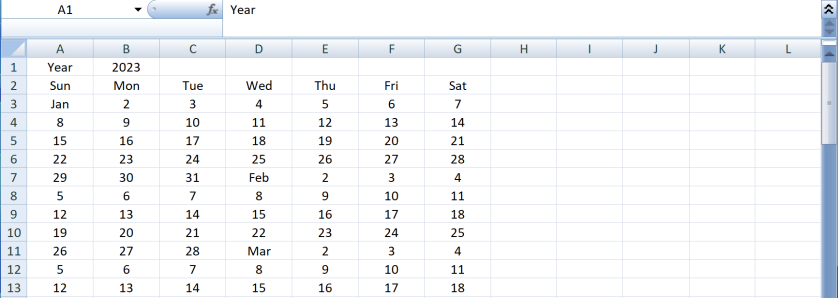
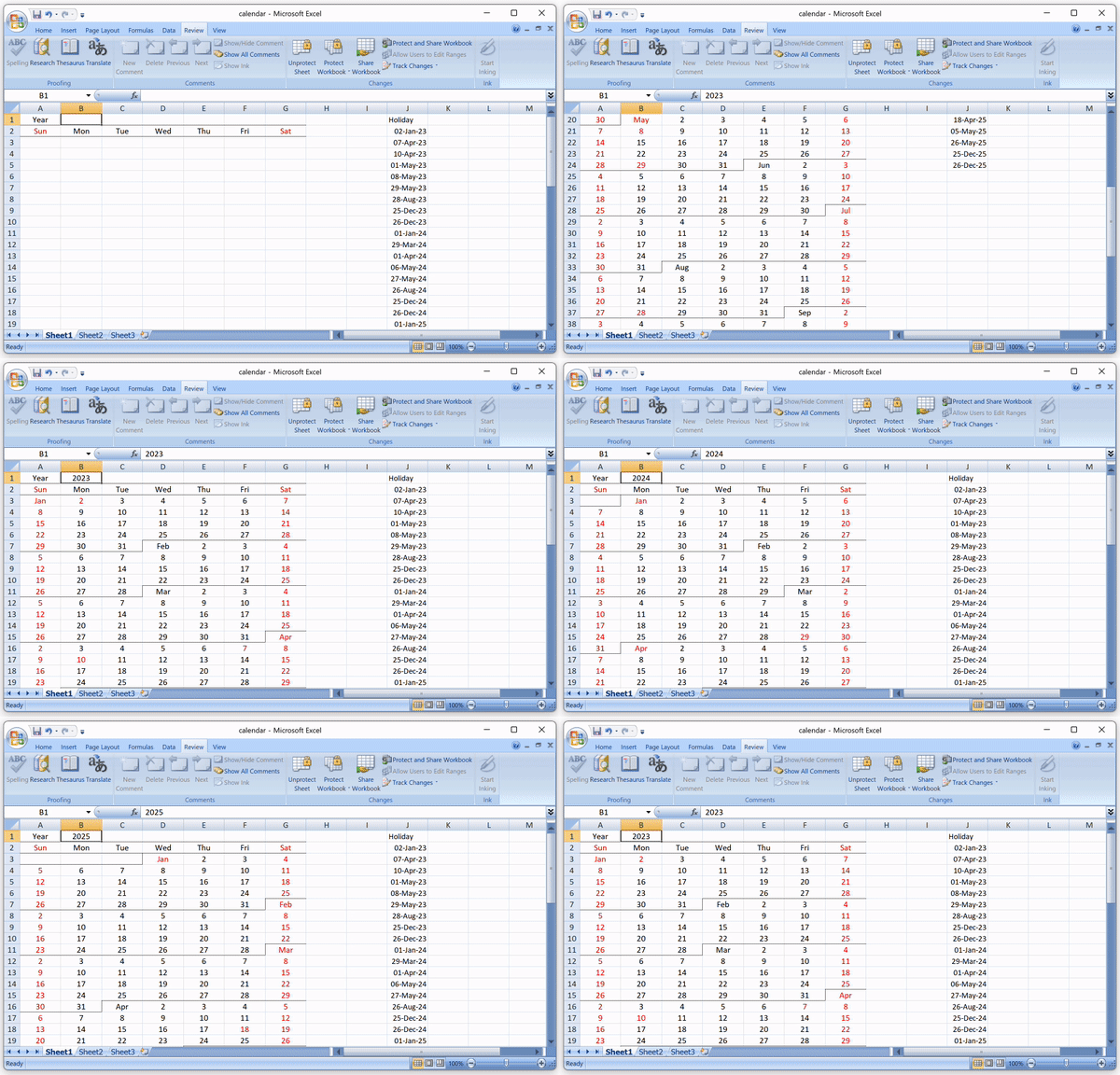
It is 2023 and I made an improved version of the Excel Calendar with a neat design and highlight the holidays.

Day of Week Header

Firstly, input the year in cell $B$1 and create the day of week header. The day of week header only apply in row 2 and we use ROW() to ensure this.

In cell B1, type the below formula and copy to B1:H1

=IF(ROW()=2,TEXT(COLUMN(),"ddd"))

Day of the year

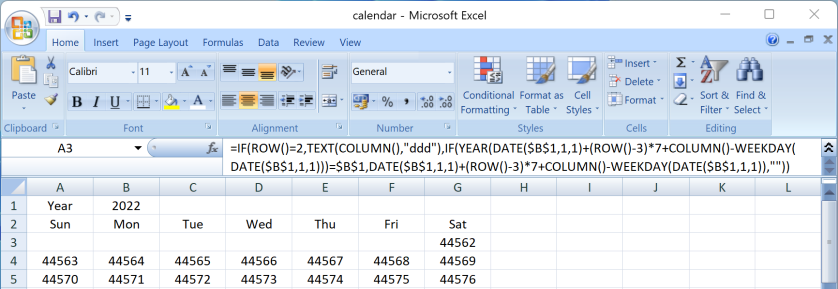
To construct the calendar, we fill up the cells with the day of the year (0-365). We need to offset by WEEKDAY(DATE($B$1, 1, 1) so day 0 fit in the correct day of week. It may not be easily noticed ince 1-Jan of 2023 is Sunday. It will be more clear if change the year to 2022.

=IF(ROW()=2,TEXT(COLUMN(),"ddd"),(ROW()-3)*7+COLUMN()-WEEKDAY(DATE($B$1,1,1)))

Date Value

Now we add the first day of the year to to make it a date value so we can use conditional formatting to format it. Here we use TEXT() to format the date for verification only. This will be removed in actual formula.

=IF(ROW()=2,TEXT(COLUMN(),"ddd"),TEXT(DATE($B$1,1,1)+(ROW()-3)*7+COLUMN()-WEEKDAY(DATE($B$1,1,1)),"yy-mm-dd"))

Hide the date that does not match the input year.

=IF(ROW()=2,TEXT(COLUMN(),"ddd"),IF(YEAR(DATE($B$1,1,1)+(ROW()-3)*7+COLUMN()-WEEKDAY(DATE($B$1,1,1)))=$B$1,DATE($B$1,1,1)+(ROW()-3)*7+COLUMN()-WEEKDAY(DATE($B$1,1,1)),""))


Fill up the worksheet

Copy the formula to cell A2:G55 to fill up the whole year

Format the calendar with Conditional Formatting

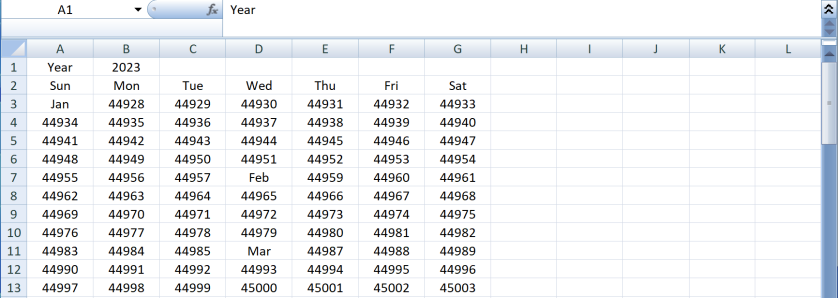
We then apply conditional formatting to format the calendar. Since the cell value is already a Date. We can use the date format to show the month name or day of month number.

Select column A:G and apply below Conditional Formatting:

Show month name

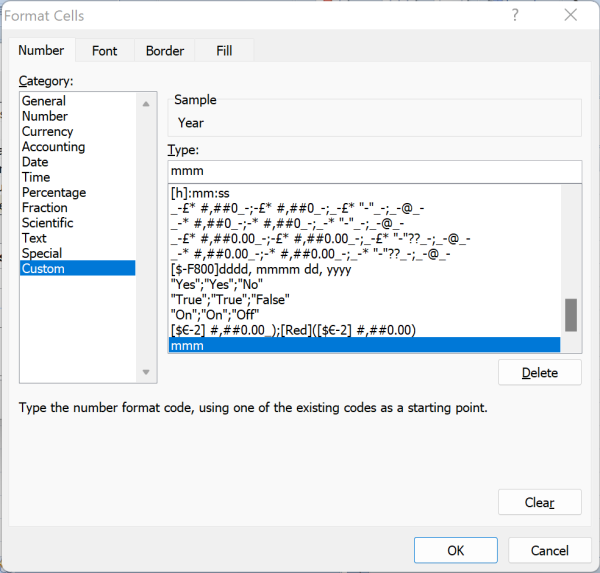
Use custom format mmm to show the month name in the first day of the month

Formula:

=AND(ROW()>2,DAY(A1)=1)

Format:

Number -> Custom -> "mmm"

Day number

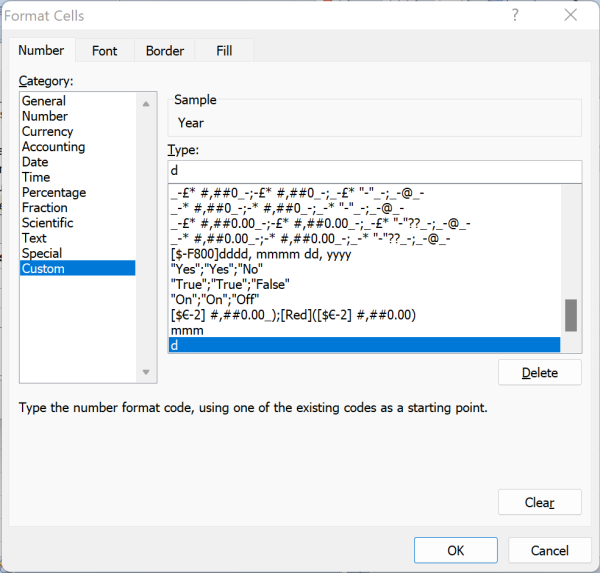
Use custom format d to show the day number of remaining days of the month

Formula:

=AND(ROW()>2,DAY(A1)>1)

Format:

Number -> Custom -> "d"

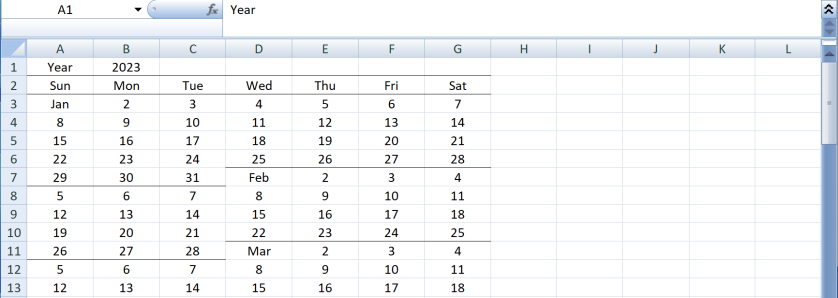
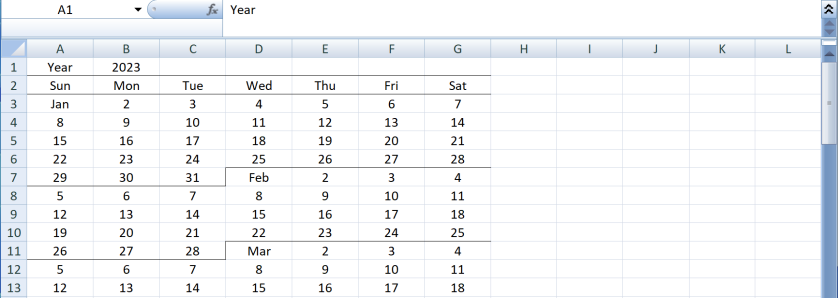
Border of month

Add a bottom border if reach end of the month (i.e. the day of month of next row is smaller than current cell

Formula

=IF(ROW()<=2,TRUE,IF(A1="",A2<>"",IF(A2="",TRUE,DAY(A1)>DAY(A2))))

Format:

Border -> Bottom border

Add a right border for the last day of the month (i.e. the cell in the right is "1")

Formula

=AND(ROW()>2,IF(AND(COLUMN()<7,B1=""),A1<>"",DAY(B1)=1))

Format

Border -> Right border

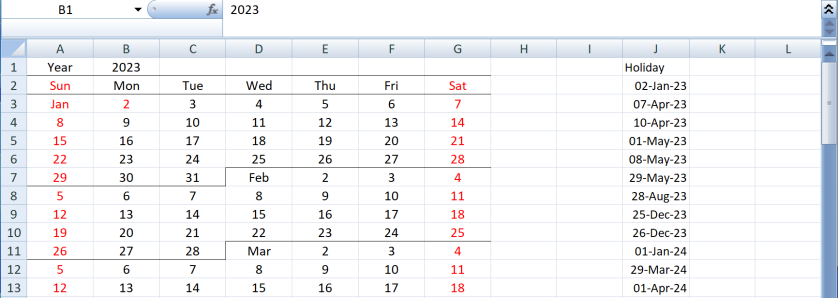
Holiday

We highlight Saturday and Sunday in red. Also we can input the holiday and use Vlookup to mark the day as holiday as well.

Formula

=AND(ROW()>1,A1<>"",OR(COLUMN()=1,COLUMN()=7,NOT(ISNA(VLOOKUP(A1,$J:$J,1,FALSE)))))

Format

Font -> Color -> Red

Protect Sheet

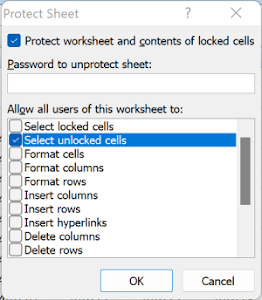
In last step, we unlock the cell $B$1 for input the year, and protect the worksheet

Sunday, December 18, 2022

Revisit Microsoft Style Guide in 2022

In 2009 I blogged about Microsoft Manual of Style (now is called Microsoft Style Guide) and list some interesting terms.  At that time I were referring to the 3rd edition which was published in 2004.  Today at 2022, let's revisit the list to see what terms are added, what are removed to have a quick review on how computing technology changes in past 18 years.

New:

  • New technology (AI, Bluetooth, Blu-ray Disc, big data)
  • Social Media (chatbot, emoji, instant message, invite, profile)
  • Cloud related
  • Mobile related (touch-, wearable, mixed reality, notification, rotate, swipe, tap)
  • Gaming (achievement, badge, e-sports)
  • Security (honeypot, malicious-, malware, multifactor authentication,  spyware, trojan)

Removed:

  • Legacy technology (CD (burn, rip), COM port, DOS, modem, diskette, push-to-talk, PCMCIA, VCR, VGA)
  • Low level computing (assembly language, DWORD, interrupt, linefeed, machine language)
  • Obseleted Microsoft products /technologies (COM, DOS, Front Page, NT, OLE, Winsock)
  • Early internet terms (webzine, net-, newsgroup, sitemap, Usenet, Weblication)
  • Pre-cloud (scale-up, virtual)
  • Intel (IA32, Itanium, Intel-based, x86)
Details:

NewRemoved
  • achievement (gaming)
  • active player 
  • AI
  • antimalware
  • antispyware
  • app
  • audiobook
  • access privileges
  • action bar
  • alt text (html)
  • assembly language
  • audit trail

  • badge (gaming)
  • big data
  • bio
  • Bluetooth
  • Blu-ray Disc

  • backward
  • bitmask
  • bitplane
  • bitwise
  • black hole (networking)
  • bulleted
  • burn (CD)
  • cell phone, cellular phone
  • cellular
  • center on
  • chatbot
  • check in
  • cloud
  • cloud platform
  • cloud services
  • community cloud
  • company vs. organization
  • compute
  • conversation as a platform (CaaP)
  • conversational user interface (CUI)
  • -core
  • cyber

  • caller ID
  • card
  • carrage return/line feed (CR/LF)
  • CBT (computer-based training, now is called e-learning)
  • CD, CD case, CD key, CD Plus
  • certificate
  • channel
  • client area (now is desktop or workspace)
  • code signing
  • COM (Component Object Model)
  • communication port (COM port)
  • comprise
  • critical process monitor
  • critical section object
  • cursor
  • dark mode
  • deceptive software
  • DevOps
  • dynamic service capacity
  • data modem
  • diskette
  • Distributed File System
  • DOS
  • double word (DWORD)
  • downlevel
  • e-discovery
  • elastic service capacity
  • e-learning
  • emoticons, emoji
  • End-User License Agreement (EULA)
  • e-sports
  • Editor
  • e-zine, webzine
  • family
  • fitness band
  • flick
  • flyout
  • freeze, frozen
  • facsimile
  • firewall
  • Fortran
  • Front Page
  • General Data Protection Regulation (GDPR)
  • Gantt chart
  • gateway
  • hang
  • hard-of-hearing
  • HDMI
  • hierarchical menu
  • high-level-language compiler
  • honeypot
  • hybrid cloud
  • hardware
  • high-level
  • highlight
  • hotfix
  • infrastructure as a service (IaaS)
  • instant message, IM
  • Internet of Things (IoT)
  • invite
  • IT pro, IT professional
  • IA-32-based
  • I-beam
  • independent content provider (ICP)
  • insertion point
  • Intel-based
  • Interrupt
  • inverse video
  • Itanium-based (Intel CPU architecture)

  • jwewl case

  • kludge
  • leading
  • license terms
  • line feed
  • localhost
  • look up
  • low-level
  • machine learning
  • malicious code, malicious user
  • malware, malicious software
  • mission critical
  • mixed reality
  • multifactor authentication
  • MAC (media access control)
  • machine language
  • Macro Assembler (MASM)
  • memory models
  • movement keys
  • MS-DOS
  • My Computer
  • natural user interface, NUI
  • .NET
  • newsreader
  • noncontinguous selection
  • notification
  • NET (net-)
  • new line
  • newsgroup
  • nonadjacent selection
  • non-Windows application
  • NT
  • off-premises, on-premises
  • onboarding
  • online services
  • open source, open-source
  • opt in, opt out
  • org, organization
  • Object Linking and Embedding (OLE)
  • online Help
  • on/off switch
  • overtype
  • page
  • pan
  • passwordless
  • pin, unpin
  • pinch
  • platform as a service (PaaS)
  • playlist
  • please
  • private cloud
  • profile
  • public cloud
  • panorama
  • patch
  • PC Card vs PCMCIA
  • pixel
  • Preface
  • prohibition sign
  • pull quote
  • push-to-talk

  • quarter inch
  • quick key
  • relationship chatbot
  • reverse video
  • rotate
  • radix, radixes
  • release notes
  • Restore button
  • rip
  • server
  • service-level agreement (SLA)
  • service-oriented architecture (SOA)
  • ship
  • single-sign-on (SSO)
  • smb
  • social chatbot
  • software as a service (SaaS)
  • software-plus-services
  • sorry
  • spyware
  • stretch
  • swipe
  • sync
  • scale up
  • Screen Tip
  • search engine
  • site map
  • software update
  • speed key
  • spider
  • stand-alone
  • Super VGA, SVGA
  • tab, double-tab, tab and hold
  • target drive, target file
  • terminate
  • text, text message
  • tile, Live Tile
  • toast
  • to-do
  • touchpad
  • touchscreen
  • touch-sensitive
  • trackball
  • trojan
  • turnkey
  • time bomb
  • title bar
  • titled vs. entitled
  • toolbar
  • toolbox
  • tooltip
  • topic
  • tutorial
  • two-dimensional, 2-D
  • Ultrabook
  • unwanted software
  • UPnP
  • URL
  • USB
  • use terms
  • Universal Naming Conversion (UNC)
  • unprintable
  • Usenet
  • utilize
  • video call, videoconference
  • video card
  • video driver
  • video game
  • virtual agent
  • voice user interface
  • voice-activated device
  • VCR (videocassette recorder)
  • VGA
  • virtual root
  • virtual server
  • virtualize
  • wearable, wearable device
  • web services
  • wellbeing
  • white hat hacker
  • whitelist
  • wireless
  • work style
  • workstream
  • worldwide vs. international
  • Weblication
  • Windows Installer
  • Winsock
  • worksheet

  • x86
  • Xbase
  • zero character

Thursday, November 17, 2022

Improve logging with DevTools console object

Every developer uses console.log() to debug in Chrome browser. However it may be difficult to locate your log messages in console window with lots of other messages.  For example:

console.log("event.key=" + event.key)
console.log("isHomeKey=" + isHomeKey)
console.log("isEndKey=" + isEndKey)


Separator

Traditionally we can add a separator to make us easier to locate what we want.

console.log("===========================")
console.log("event.key=" + event.key)
console.log("isHomeKey=" + isHomeKey)
console.log("isEndKey=" + isEndKey)
console.log("===========================")


CSS

Or we can use custom css to make the log messages stand out.  Notice the "%c" in the message as the placeholder of the css.

console.log("%cevent.key=" + event.key, "font-size:1.5em; color:red")
console.log("%cisHomekey=" + isHomekey, "font-size:1.5em; color:red")
console.log("%cisEndKey=" + isEndKey, "font-size:1.5em; color:red")


console.warn()

On the other hand, w can use console.warn() to log the messages. It is displayed with different background color.  We can also use the filter buttons to show warning message only.  Notice that we should use console.warn() in ad-hoc debug only and should not be used in production code for debug purpose.

console.warn("event.key=" + event.key)
console.warn("isHomeKey=" + isHomeKey)
console.warn("isEndKey=" + isEndKey)


Object

We can further simplify by code by creating a ad-hoc object.  Chrome can nicely display key-value pair.

console.warn({key:event.key, isHomeKey, isEndKey})


console.table()

console.table() is another powerful tool for logging. It displays the values in a nicely formatted table.

console.table({key:event.key, isHomeKey, isEndKey})

You can check out the Console API reference for other powerful functions of the console object.

Monday, November 14, 2022

When hardware is cheaper than programmer

I read an article "Learn From Google’s Data Engineers: Don’t Optimize Your SQL". The article is now offline and you can find it in archive.org.

The article is talking about Google engineers made snapshots of tables every few minutes to track dimension history instead of spending time to write complex SQL MERGE statements which seems to be more proper. The author concluded that it makes more sense for Google as the cost of storage of those snapshots is much lower than the salary of the engineers.

mighty Data Engineer’s time is more valuable to move fast and create business value, than to waste their valuable time writing MERGE statements

In recent years, especially in the cloud era, more people prefer to buy bigger machines or add more instances over spending time to optimise the code. I saw new programmers always use simple data structure like array or map in all scenario. They don't have the concept of Big O notation and use brute force to solve problems. I still remember the good old days that we need to optimize the C program with byte alignment, memory pool, and use ++i instead of i++ for the little gain of performance.

Time flies. Now it may not bt economically efficient to spend time to optimize your code. But we need to consider sustainable engineering and carbon friendly coding. Think about that your bad code may exist for 10 years and keep consuming extra energy which can be reduce if you spend some time to optimise it in first place. In addition, optimizing code is fun.  Identifying and fixing performance issues in a program is a challenging and rewarding process. It requires us to use analytical and critical thinking skills to find creative solutions, which can be a satisfying experience. I will spend hours in LeetCode in order to beat 100% of submissions, which I don't need to, but is fun.

Friday, November 11, 2022

Create calendar with Excel formula and conditional formatting

We can build a calendar in Excel with only formula and conditional formatting.
  

Year


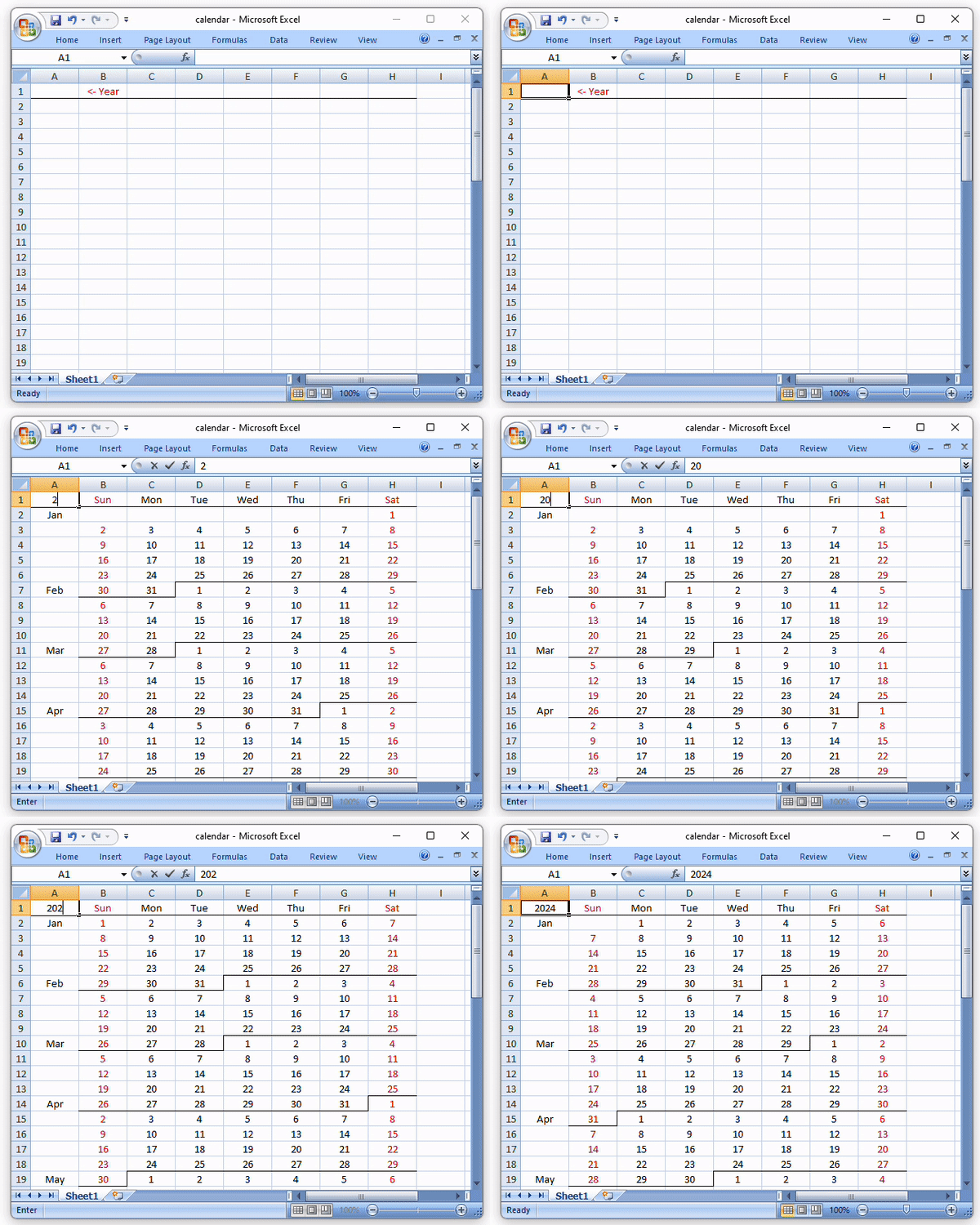
Firstly type the year "2022" in cell A1.  You can type any year and the calendar will automatic update.

Day of Week Header


We use COLUMN() to get the day of week numeric value.

In cell B1, type the below formula and copy to B1:H1.

=TEXT(COLUMN()-1, "ddd")


Calendar Body


Then we fill the cells with the days count.

In cell B2, type the below formula and copy to B2:H55.

=(ROW()-2)*7+COLUMN()-1


and offset with day of week of 1-Jan, so "0" is 1-Jan, "1" is 2-Jan and so on.

=(ROW()-2)*7+COLUMN()-1-WEEKDAY(DATE($A$1,1,1))


Now we can construct the date by adding 1-Jan to the days count. Format the date to verify the formula is correct.

=TEXT(DATE($A$1,1,1)+(ROW()-2)*7+COLUMN()-1-WEEKDAY(DATE($A$1,1,1)),"yy-mm-dd")


Finally, we should only show date of current year, and the day of month instead of full date.

In cell B2, type the below formula and copy to B2:H55.

=IF(YEAR((DATE($A$1,1,1)+(ROW()-2)*7+COLUMN()-1-WEEKDAY(DATE($A$1,1,1))))=$A$1,DAY((DATE($A$1,1,1)+(ROW()-2)*7+COLUMN()-1-WEEKDAY(DATE($A$1,1,1)))),"")


Month Header


Next need to show the month in column A. If the row contains first day ("1") means it is a new month.  We can use MIN()=1 to determine if the row contains 1 instead of VLOOKUP(). And use TEXT(..., "mmm") to get the month name.

In cell A2, type the below formula and copy to A2:A55.

=IF(MIN(B2:H2)=1,TEXT(DATE($A$1,1,1)+(ROW(H2)-2)*7+COLUMN(H2)-1-WEEKDAY(DATE($A$1,1,1)),"mmm"),"")


Put everything together


We can put all three formula together. Apply the day of week formula in row 1, the month name formula in column 1. Also show a message in cell $A$2 if the year is not a number.

In cell A1, type the following formula and copy to A1:H55.

=IF(ADDRESS(ROW(),COLUMN())="$A$1","",IF(NOT(ISNUMBER($A$1)),IF(ADDRESS(ROW(),COLUMN())="$B$1","<- Year",""),IF(ROW()=1,TEXT(COLUMN()-1, "ddd"),IF(COLUMN()=1,IF(MIN($B1:$H1)=1,TEXT(DATE($A$1,1,1)+(ROW($H1)-2)*7+COLUMN($H1)-1-WEEKDAY(DATE($A$1,1,1)),"mmm"),""),IF(YEAR((DATE($A$1,1,1)+(ROW()-2)*7+COLUMN()-1-WEEKDAY(DATE($A$1,1,1))))=$A$1,DAY((DATE($A$1,1,1)+(ROW()-2)*7+COLUMN()-1-WEEKDAY(DATE($A$1,1,1)))),"")))))

Format


The calendar if half done now.  We need to add some format.

Select column A:H, apply the below formula in Conditional Formatting.

1. Add the bottom border as month separator if it is the first row (header) or the below is smaller that itself (i.e. next month)

=IF(ROW(A1)=1,TRUE,AND(COLUMN(A1)>1,A1<>"",A2<>"",A1>A2))


2. Add the right border as month separator in same row

=AND(COLUMN(A1)>1,ROW(A1)>1,A1<>"",B1=1)


3. Highlight Sat and Sunday to be red

=OR(COLUMN(A1)=2,COLUMN(A1)=8)


Finally , center align column A:H.  The calendar is done.


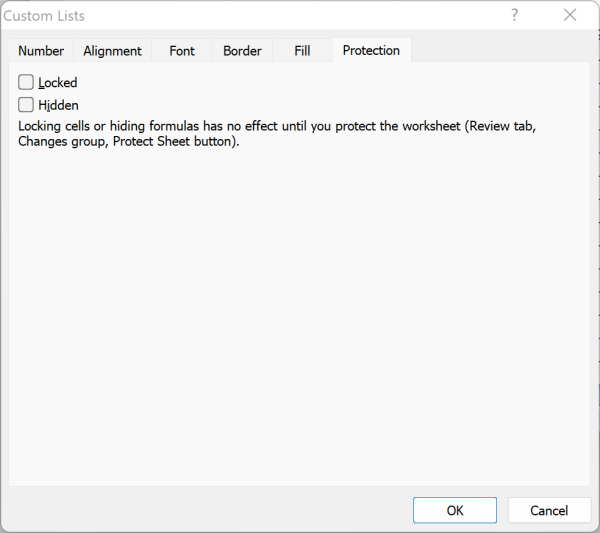
In addition, we can protect the worksheet and only allow to input the year.  Right click the cell A1, select "Format Cell", uncheck the "Locked" check box.

In menu "Review" -> "Protect Sheet".


Friday, February 5, 2010

Fix the XPath problem in Firefox 3.6

In Greasemonkey development, it is a common practice to use GM_xmlhttpRequest + DOM Document Wrapper + XPath to process cross-origin content. However in Firefox 3.6, the XPath query stop working. Here is the fix: 

Firefox 3.5

var doc = document.implementation.createDocument("", "", null);
div.innerHTML = html;
doc.appendChild(div);
var res = doc.evaluate("//p[@class='content']/span", div, null, XPathResult.FIRST_ORDERED_NODE_TYPE, null).singleNodeValue;
// res is null

Firefox 3.6

var isFF36up = false;
if (navigator.userAgent) {
  var ffver = navigator.userAgent.match(/Firefox\/3\.(\d+)/);
  isFF36up = ffver && parseInt(ffver[1], 10) >= 6;
}

var nsResolver = {
  lookupNamespaceURI:function (prefix) {
    if (isFF36up && prefix == "ns") {
      return "http://www.w3.org/1999/xhtml";
    }
    else {
      return "";
    }
  }
};

var doc = document.implementation.createDocument("", "", null);
div.innerHTML = html;
doc.appendChild(div);
var res = doc.evaluate("//ns:p[@class='content']/ns:span", div, nsResolver, XPathResult.FIRST_ORDERED_NODE_TYPE, null).singleNodeValue;

Sunday, May 17, 2009

Microsoft Manual of Style

Microsoft Manual of Style is a bible for programmers to write more accurate, neutral, objective and end-user-friendly documents.

It covers everying we need to know when writing technical documents including writing style, page layout, grammer, punctuation, tone and rhetoric formatting style for number, measurements, date etc.

The best part to me is the "Usage Dictionary".  It lists over 1,000 common words, terms, acronyms and state the proper way to use them, the dos and don't with examples.

Below are some examples I found is very useful and interesting.

active vs. current
        Use active or open, not current, to refer to open and operating windows, programs, documents, files, devices, or portions of the screen (such as an “open window” or “active cell”). However, use current to refer to a drive, directory, folder, or other element that does not change in the context of the discussion.

boot
        Do not use boot as a verb; use start or restart instead, and make clear that start refers to the computer, not to a program. Use turn on to refer to turning on the computer.

crash
        Jargon. Do not use in content for home users and information workers, and avoid in content for software developers and information technology professionals. Use fail for disks or stop responding for programs or the operating system.

debug
        Debug is a valid technical term in content for software developers. Do not use debug in any context as a synonym for troubleshoot. Use troubleshoot or a more accurate word or phrase instead.

default
        Many home users and information workers do not understand that default refers to something that happens if the user does not take an action or does not supply a required value. Consider whether you need to explain the meaning of default in your content or even whether your content can dispense with default altogether.

dialog box
        Always use dialog box, not just dialog, and not pop-up window

e-mail
        Always hyphenate. Do not use as a verb; use send instead.

execute, run
        Do not use execute in content for home users or information workers except to follow the user interface. Use run instead.

illegal
        Use illegal only in specific situations, such as notices on software that say “Do not make illegal copies of this disk”.  Do not use to mean invalid or not valid.

input
        Avoid in all content as a verb; use type or another appropriate verb instead.

interface
        Use as a noun only, as in “user interface” and “application programming interface.” Interface as a verb is jargon. Use interact or communicate instead.

log on, log off, logon, logoff
        Use log on or log on to (not log onto) to refer to creating a user session on a computer or a network. Use sign in and sign out to refer to creating and ending a user session on the Internet.

navigate
        Do not use to refer to the act of going from place to place on the World Wide Web or need on an intranet Web. Use browse instead.

overwrite
        Use only to refer to replacing new data with existing data. Use replace to refer to replacing an existing file with a new one with the same name.

patch
        Do not use; use update instead.

plaintext vs. plain text
        Use plaintext only to refer to nonencrypted or decrypted text in material about encryption. Use plain text to refer to ASCII files.

pop-up
        Do not use as a noun. Avoid as a verb; instead, use a term that more accurately describes the action, such as open or appear.

power down, power up; power off, power on
        Do not use; use turn off and turn on instead. Do not use shut down to refer to turning off a computer.

prompt
        Do not use prompt as a synonym for message. A prompt is a signal, which may or may not be a message, that a program or the operating system is waiting for the user to take some action. Use prompt as a verb to describe the act of requesting information or an action from the user.

purge
        Do not use because of negative associations in ordinary English usage. Use delete, clear, or remove instead.

quit
        Avoid. Use exit instead to refer to the user action of closing a program. Use close to refer to the user action of closing a document or a window. Use close to refer to the action a program takes to close itself. Use log off to refer to ending a user session on a computer or on a network or Internet connection.

read-only
        Always hyphenate.

read/write
        Use read/write, not read-write, as in “read/write permission.”

real time, real-time
        Two words as a noun. Hyphenate as an adjective.

reboot
        Do not use; use restart instead, and take care to establish that it is the computer, not a program, that is restarting.

stop
        Acceptable to use to refer to hardware operations, as in “stop a print job.” Use exit with programs.

Tuesday, December 16, 2008

Chrome 1.0 (not Chromium) supports Greasemonkey now

ChromonkeyGoogle Chrome 1.0 supports Greasemonkey.  You can use Google Reader Unread Count and Better Mobile Twitter in Chrome now.
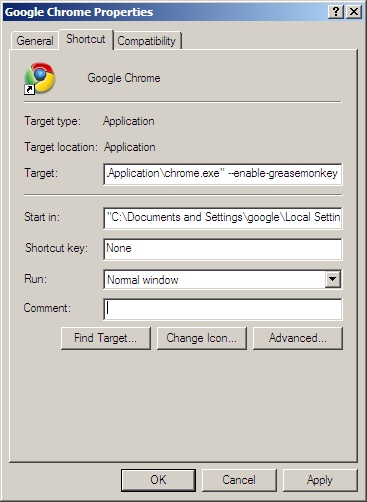
To enable Greasemonkey in Chrome, download and install the latest Chrome. Right click your Chrome shortcut, add "--enable-greasemonkey" to the end of the "Target" box (see below).  Finally, you have to put the scripts in the folder "C:\scripts\" and the script files' extension must be ".user.js".

Friday, December 5, 2008

Google Reader has new look

Google Reader has new look.  I like the collapsible section so I can free more space for the feed list.  And I'm please to tell you that my Google Reader Unread Count greasemonkey script still works for new look.  Enjoy it.

Monday, October 13, 2008

Better Mobile Twitter user script

I always keep a tab in Firefox opening Twitter and I prefer the mobile version instead of the standard one for speed and simplicity. Despite the simplicity, one thing I would like to have is automatically load next page when the mouse scroll to bottom (just like what Google Reader does). As a result I come up with the Better Mobile Twitter user script. You can install in http://userscripts.org/scripts/show/35396. Below is showing how it works, or you can watch in high quality.

Tuesday, April 22, 2008

From EeePC to SLC/MLC SSD

Recently the 9 inch EeePC catches everyone's eye because of the price (under HKD 4,000) and the large 20G SSD. However it raises a big concern after people discovered that the 20GB SSD is made up of 4G SLC + 16G MLC.  Since the life-span of MLC is much lower than SLC and can only survives for 10,000 writes. Someone in a forum even claim that "the SSD will die after 1 month if write to the disk 30 times a day".

I did some research on this.

The smallest unit of SSD is "page", which is usually 2KB in size. Each time SSD write s data to a page, it will need to erase the data first.  This is called erase/write cycle. It is also why writing is SSD is slower because it needs two operations.  When SSD erases data, it is in the unit of "block", which is 64 pages or 128KB data.  So the 10,000 write cycles means each block can be written 10,000 times. Assuming writing 1GB of data every day, a 8GB MLC SSD can last for 219 years (8 * 10000 / 365).

There may be case that it keep writing on the same block and used up the limit of that block.  To solve this, there is a technique called "wear leveling" to balance the erase count of each block.  For example, when there is need to write to a block with high erase count, it will swap the data in this block with another block with lower erase count (this is done by the SSD chips in background).  Note that a swapping is also counted as erase/write and impact the write speed.  Another technique is to reserve some blocks which didn't count as capacity.  When a block's erase count reaches the limit, The reserved block will step it.  This method can reduce the swapping overhead.

After all the life of SSD should not be a concern to for you to buy a EeePC.

Saturday, November 24, 2007

Howto install Firefox 3 to co-exists with Firefox 2

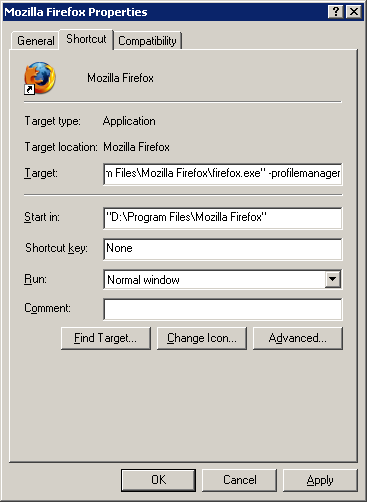
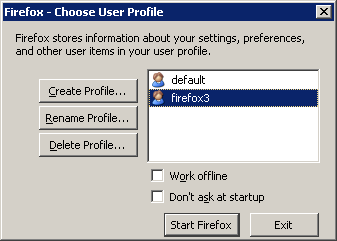
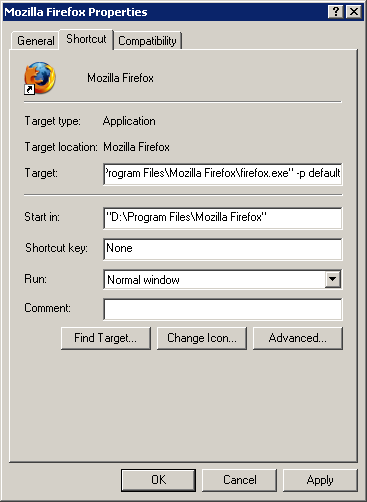
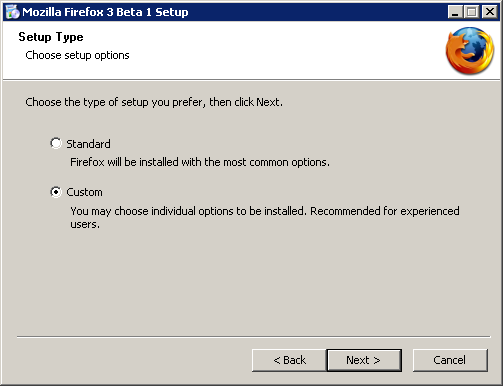
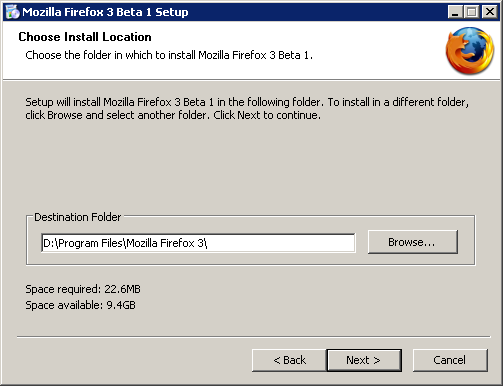
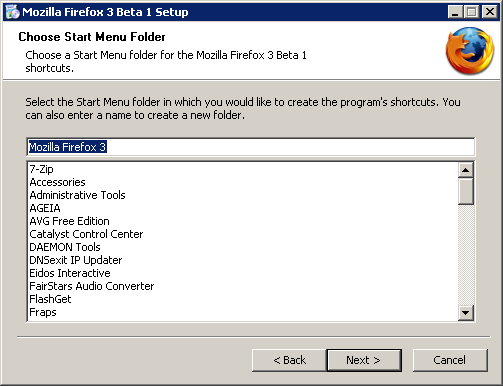
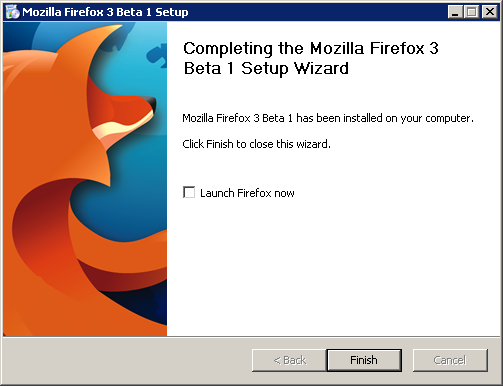
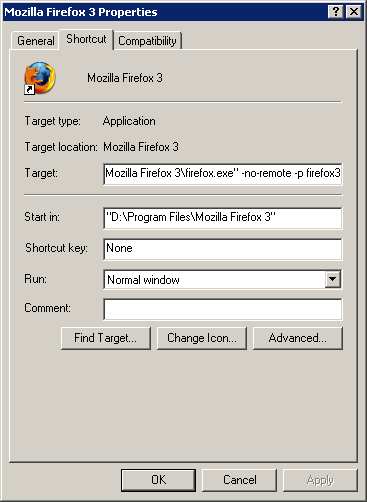
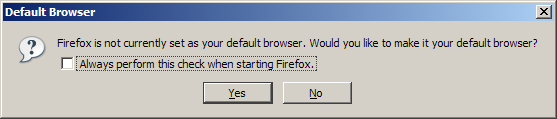
Mozilla just release Firefox 3 Beta 1. Review said it is much faster and consume less memory. It definitely worth a try but for the obvious reason you have to keep your Firefox 2. Here is the steps show you how to install Firefox 3 and make it co-exists with Firefox 2. 1. Right click the shortcut of the Firefox 2, click "Properties". Add "-profilemanager" at the end of the shortcut path. Click OK. Then run this shortcut to launch Firefox Profile Manager. 2. Create a new profile, name it "firefox3". And uncheck the "Don't ask at startup" 3. Go to Properties of the Firefox 2 shortcut again, remove the "-profilemanager" and add "-p default" at the end of the path. This forces Firefox 2 to open the original profile. 4. Start install Firefox 3. Choose "Custom" when you are asked. 5. The default Destination Folder is "Mozilla Firefox 3 Beta 1", which is stupid when you later update to Beta 2, Beta 3 or even 3.0.1. So change it to Mozilla Firefox 3 6. Same in Start Menu Folder name. 7. When installation completed, uncheck the "Launch Firefox now". You still have something to do before you can run it. 8. Go to the Properties of the Firefox 3 shortcut. Append "-no-remote -p firefox3" to the Target. The "-no-remote" will let Firefox run a separate instance. The "-p firefox3" will force your Firefox 3 to run the newly clean profile. 9. Run the Firefox 3, and you will be prompted that your Firefox is not the default browser. DON'T click Yes. Firefox 3 is not stable and you won't like to use it as your default browser. Simple uncheck the "Always perform this check when starting Firefox" and click No. 10. Now you can run Firefox 2 and Firefox 3 at the same time. Enjoy it.